Log it in two taps.
Nothing else to do.
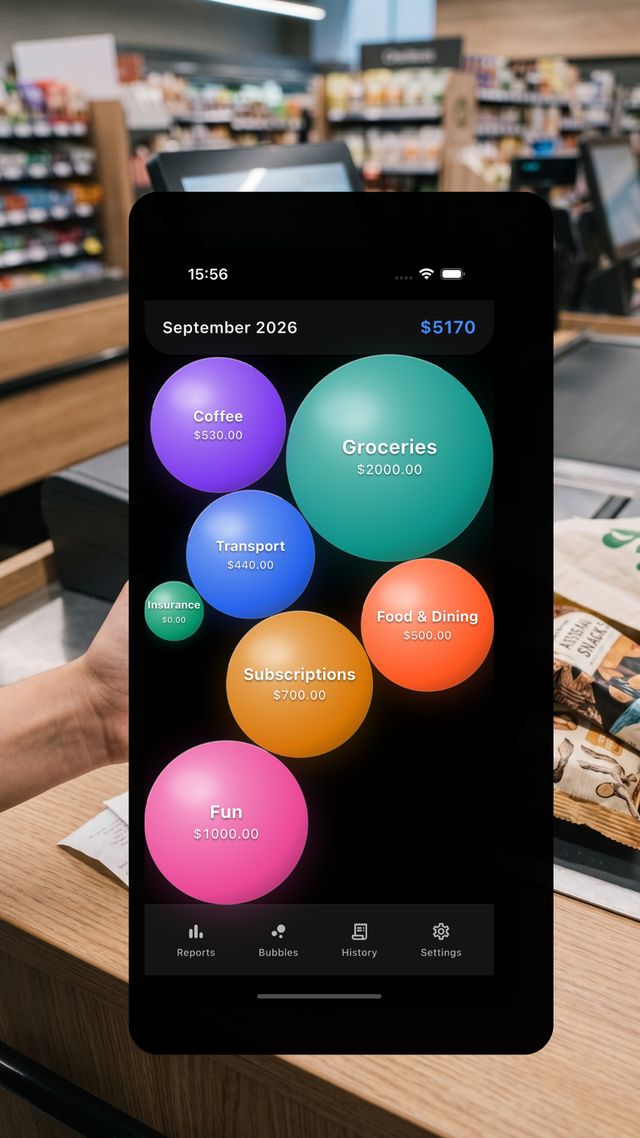
Bubble Budget puts every spending category on one canvas as a bubble you can touch. Tap the bubble, type the amount — that's the whole interaction. No menus, no dropdowns, no sign-up.
Free on the App Store. Works on a plane. Nothing to cancel.
Tap a bubble ↓
Straight from the app.
Screenshots, not mockups. These show the dark theme — Settings has a light one too.
Five things this app doesn't do.
Bubble Budget is shaped as much by what was left out as by what went in. Each of these was a deliberate decision, and together they are why logging a coffee takes two seconds.
- 1 Tap the Coffee bubble — the keypad is already open
- 2 Tap +5, or type the amount and log it
The bubble grows a little. Its ring edges toward amber. Your whole month updated in about two seconds, without leaving the screen or making a single decision about where the entry belongs.
Three visual channels. Zero mental maths.
A spreadsheet makes you compare numbers. A canvas of bubbles lets you see the answer before you've finished looking at it.
Size is the amount
Each bubble's area is proportional to what you've spent. Groceries ballooning past everything else isn't a number you have to notice — it's the biggest thing on screen.
Colour is identity
Pick a colour per category once and your muscle memory does the rest. After a week you stop reading labels and start reaching straight for the teal one.
Rings are your limits
Set a limit on a category and its bubble starts drawing a ring as you approach it. Leave the limit off and it simply grows. No push notifications, no red banners, no shame — just a ring that's there when you look.
Small app. Serious about the two seconds that matter.
Everything here exists to protect one thing: the moment you decide whether logging this is worth the effort.
Tactile glass physics
Bubbles drift, jostle and settle on a single canvas with real momentum. It feels like moving objects around a desk, not editing a database row.
Two taps, then the keypad
Tapping a bubble opens the numeric sheet instantly. No transaction type, no category picker, no date field you have to confirm.
Quick-add chips
+5 · +10 · +25 sitting right above the keypad. The parking meter, the flat white, the round of coffees — logged before the card terminal beeps.
Offline-first, local SQLite
Your ledger lives in a SQLite file on your own device. No server round-trip, no loading spinner, no "you're offline" screen. Ever.
Your spreadsheet, your call
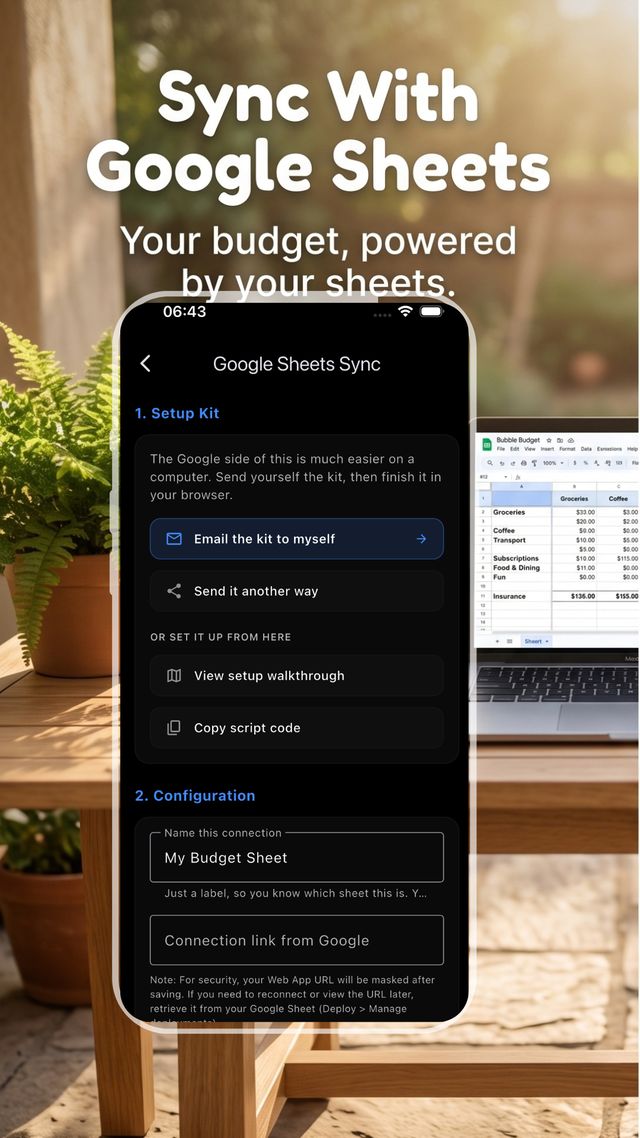
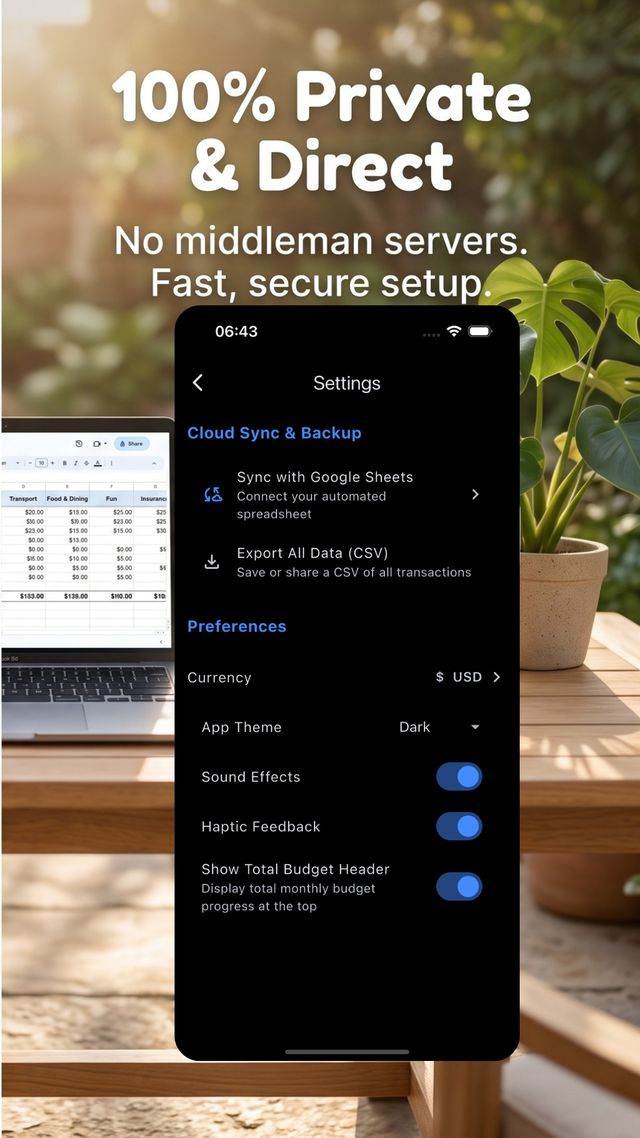
Sync to a Google Sheet you own via a script you install, or export every transaction as a CSV straight from Settings. Both routes skip us entirely.
In-app KPI reports
Burn rate, biggest movers, month-over-month deltas and category shares — computed on-device, in a report you can read in ten seconds.
Your spending never leaves your phone.
Bubble Budget has no back end at all. There is no account to create and no copy of your ledger anywhere but your phone — so there is nothing to breach, nothing to sell, and nothing to lock behind a subscription.
- ✓Local SQLite storage. One database file, on your device, under your control.
- ✓Zero telemetry. No analytics SDK, no crash-tracking pixel, no ad identifiers.
- ✓No bank connection. We never ask for credentials, because we never need them.
- ✓Yours to export. Every transaction out as a CSV any time, sync or no sync.
Where your data actually goes
- 1 You tap a bubble — the entry is written to a SQLite file on your phone
- 2 That is the end of the journey, unless you switch on Sheet sync
- 3 With sync on, it posts to your Google Sheet — your account, not ours
There is no further step where it reaches a server of ours, because there isn't one.
Offline by default. Spreadsheet on demand.
Some months you just want the bubbles. Some months you want pivot tables. Two ways to get there, and you never have to choose one permanently.
Sync to your Google Sheet
Paste in a short Apps Script and entries post straight from your phone to a sheet you own, as you log them. Automated dashboards build themselves from the rows.
Just export the file
Don't want sync, or don't want a Google account in the loop? Settings → Export All Data (CSV) saves or shares every transaction as a CSV you can open in Excel, Numbers, Sheets or anything else. No setup, no script, no account.
| Category | Share | Spent |
|---|---|---|
| Groceries | 412.60 | |
| Eating out | 298.15 | |
| Transport | 216.00 | |
| Coffee | 174.50 | |
| Subscriptions | 128.90 | |
| Everything else | 53.85 |
The questions people actually ask
Is it really free, with no subscription?
Yes. There's no server to pay for, so there's no recurring bill to pass on to you. No trial timer, no locked reports, no "Pro" tier hiding the useful half of the app.
Does it connect to my bank?
No, by choice. Linking a bank means handing credentials to a third party, and imported transactions still need sorting into categories afterwards. We would rather make logging cheap enough in the moment that you simply do it as you go.
What happens to my data if I delete the app?
It goes with it — the database is a local file, not a row in someone's cloud. If you want a copy that outlives the app, turn on Google Sheet sync and the ledger lives in your own spreadsheet too.
How does the Google Sheet sync work?
You create a sheet, deploy a short Google Apps Script that Bubble Budget gives you, and paste the resulting URL into the app. Entries post directly from your phone to your sheet. Nothing routes through us, because there is no us to route through.
Can I set limits per category?
Yes, and it's optional per category. Set a limit and that bubble draws a ring as you approach it, visible at a glance on the canvas without a single notification. Skip the limit and the bubble just grows.
Can I get my data out without setting up sync?
Yes. Settings → Export All Data (CSV) saves or shares every transaction as a CSV, which opens anywhere — Excel, Numbers, Sheets. The Apps Script sync is for people who want it landing in a sheet continuously; export is for everyone else.
Does it have a light theme?
Both. Settings has an App Theme control — dark or light, your choice. The screenshots on this page show the dark theme.
Which platforms is it on?
On iPhone today, free on the App Store. It is built in Flutter, so an Android build is planned from the same codebase.
The budget app you'll still be using in March.
Because it never asked you to sign up, never charged you, and never made you fill in a form to record a coffee.
No account. No subscription. No tracking.